GPU Server Intake & Validation#
This reference architecture provides a Kubernetes-based workflow for receiving, validating, and releasing AMD GPU servers to production. It establishes a systematic approach to hardware qualification that ensures only validated, healthy GPU nodes enter your production clusters.
Overview#
The GPU Server Intake & Validation workflow consists of five phases that take a server from dock receipt to production readiness:
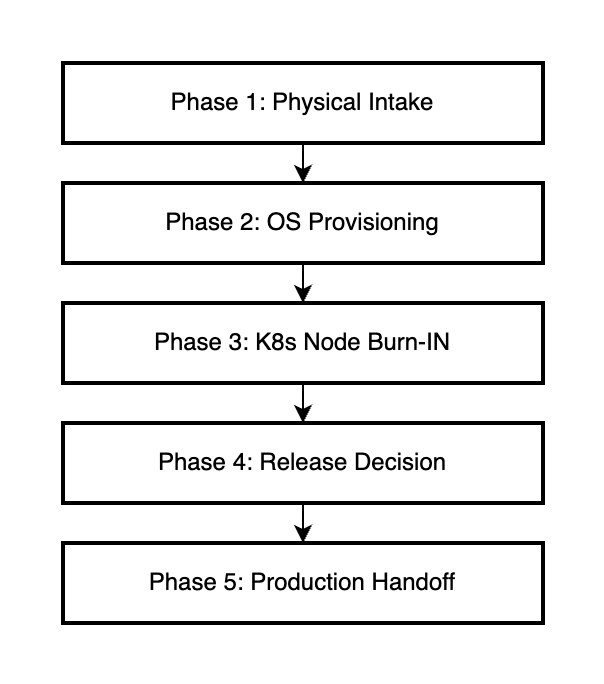
Phases 1 and 2 (Physical Intake and OS Provisioning) are handled by existing customer processes and tooling. This reference architecture focuses on Phases 3-5, which leverage Kubernetes and AMD’s operators for automated hardware validation.
Detailed Workflow#
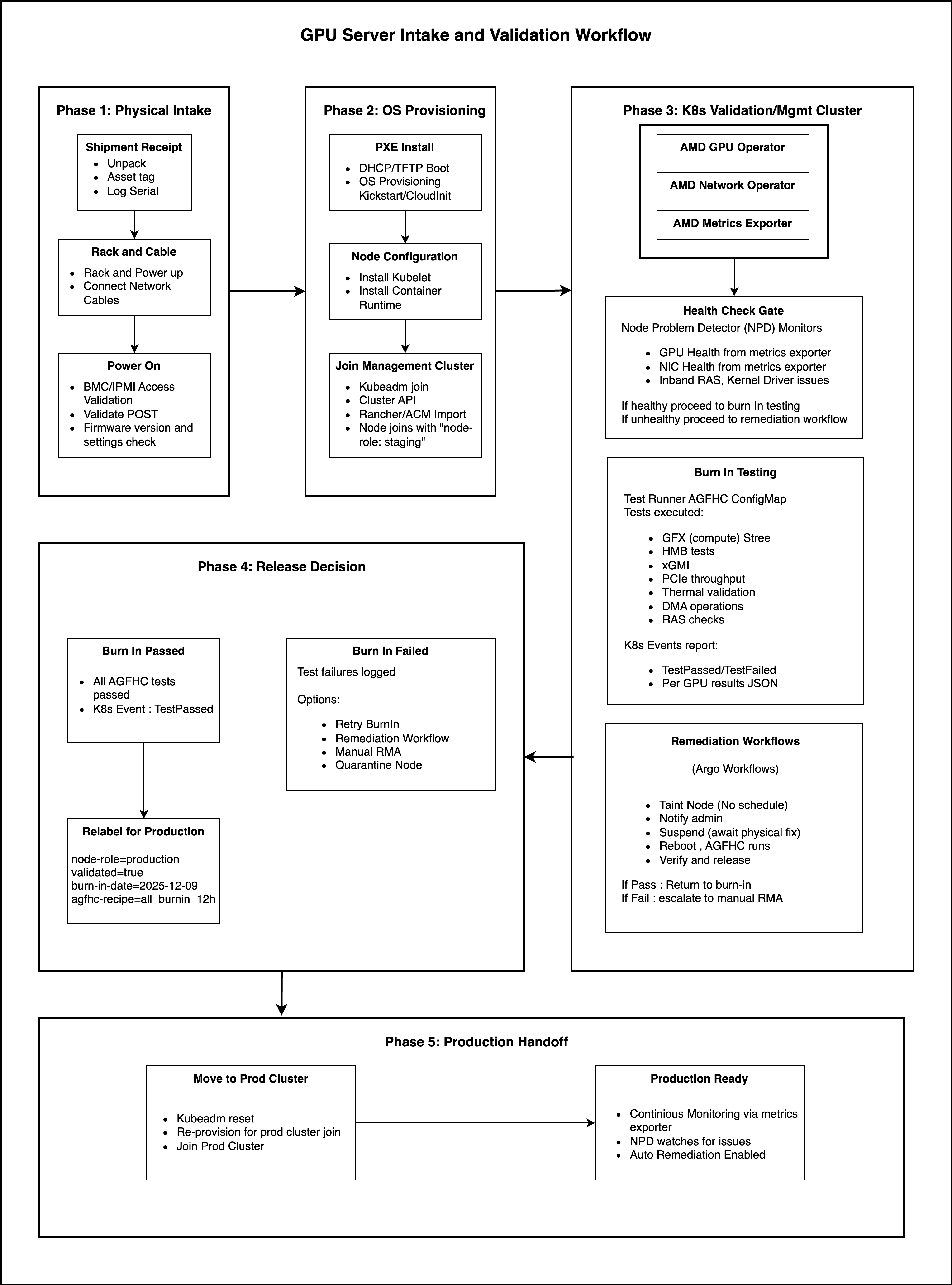
The following diagram shows the complete workflow with all components and decision points:
Phase 1: Physical Intake (Customer-Managed)#
Physical intake covers the initial receipt and installation of GPU servers in the datacenter.
Step |
Activities |
|---|---|
Shipment Receipt |
Unpack, asset tag, log serial numbers |
Rack and Cable |
Mount in rack, connect power, connect network cables |
Power On |
BMC/IPMI access validation, validate POST, firmware version and settings check |
This phase uses existing customer datacenter processes and is outside the scope of this reference architecture.
Phase 2: OS Provisioning (Customer-Managed)#
OS provisioning prepares the server with the base operating system and Kubernetes components.
Step |
Activities |
|---|---|
PXE Install |
DHCP/TFTP boot, OS provisioning via Kickstart/Cloud-init |
Node Configuration |
Install kubelet, install container runtime |
Join Validation Cluster |
kubeadm join, Cluster API, or Rancher/ACM import; node joins with label |
This phase uses existing customer provisioning tools. A future MAAS-based provisioning reference will provide a turnkey solution.
Phase 3: K8s Validation/Validation Cluster#
This is where Kubernetes-based hardware validation begins. The validation cluster runs the AMD operators and executes burn-in testing.
Note
Ready-to-Use Recipe for a Validation Cluster: The GPU Validation Cluster repository provides scripts and manifests to deploy a lightweight k3s-based validation cluster. It supports up to 250 GPU nodes in parallel and includes pre-configured AGFHC test recipes.
3.1 Validation Cluster Components#
The validation cluster must have the following AMD components deployed:
Component |
Purpose |
|---|---|
AMD GPU Operator |
GPU driver lifecycle, device plugin, test runner |
AMD Network Operator |
AINIC driver lifecycle, Multus CNI (if validating NICs) |
AMD Metrics Exporter |
GPU and NIC telemetry for health monitoring |
3.2 Health Check Gate#
Before burn-in testing begins, Node Problem Detector (NPD) monitors initial node health:
NPD Monitors:
GPU health from metrics exporter
NIC health from metrics exporter
Inband RAS, kernel/driver issues
Decision:
If healthy → proceed to burn-in testing
If unhealthy → proceed to remediation workflow
3.3 Burn-In Testing#
The GPU Operator’s Test Runner executes AGFHC (AMD GPU Field Health Check) via a Kubernetes Job.
Test Runner Configuration (ConfigMap):
Tests Executed:
GFX (compute) stress
HBM memory tests
xGMI interconnect validation
PCIe throughput
Thermal validation
DMA operations
RAS checks
AGFHC Recipe Options:
Recipe |
Duration |
Use Case |
|---|---|---|
|
~5 min |
Quick sanity check |
|
~1 hour |
Standard validation |
|
~4 hours |
Extended burn-in |
|
~12 hours |
Production qualification |
|
~24 hours |
Maximum stress validation |
Kubernetes Events Report:
TestPassed/TestFailedeventsPer-GPU results in JSON format
3.4 Remediation Workflows#
If burn-in testing fails, the GPU Operator triggers an Argo Workflow for automated remediation:
Outcome:
If Pass → return to burn-in testing
If Fail → escalate to manual RMA
Phase 4: Release Decision#
After burn-in testing completes, a release decision is made based on test results.
4.1 Burn-In Passed#
When all AGFHC tests pass:
Kubernetes Event:
TestPassedNode is eligible for production
Relabel for Production:
4.2 Burn-In Failed#
When tests fail, the following options are available:
Option |
Description |
|---|---|
Retry Burn-In |
Re-run the test suite after transient issue resolution |
Remediation Workflow |
Trigger automated remediation via Argo Workflows |
Manual RMA |
Escalate to hardware replacement |
Quarantine Node |
Isolate node for further investigation |
Test failures are logged with detailed per-GPU results in JSON format for troubleshooting.
Phase 5: Production Handoff#
Once a node passes validation, it can be released to a production cluster.
5.1 Move to Production Cluster#
If the validation cluster is separate from production:
5.2 Production Ready#
Once in the production cluster, the node operates with:
Continuous Monitoring via metrics exporter
NPD watches for GPU/NIC health issues
Auto-Remediation Enabled for production incidents
Prerequisites#
Hardware Requirements#
Component |
Specification |
|---|---|
GPU |
AMD Instinct™ MI300X, MI325X, MI350X, or MI355X |
NIC |
AMD Pensando Pollara AINIC (optional) |
CPU |
AMD EPYC™ processor (recommended) |
Software Requirements#
Component |
Version |
|---|---|
Kubernetes |
v1.29+ |
Operating System |
Ubuntu 22.04 LTS or Ubuntu 24.04 LTS |
Container Runtime |
containerd with GPU support |
ROCm |
6.0+ |
Helm |
v3.2+ |
Validation Cluster Components#
Component |
Installation |
|---|---|
AMD GPU Operator |
|
AMD Network Operator |
|
Node Problem Detector |
|
Argo Workflows |
Summary#
This reference architecture provides a systematic, Kubernetes-native approach to GPU server validation:
Automated Testing: AGFHC burn-in via GPU Operator Test Runner
Health Monitoring: Continuous metrics and NPD integration
Automated Remediation: Argo Workflows handle failures
Clear Release Criteria: Pass/fail decisions with full traceability
Production Ready: Validated nodes with proper labeling and monitoring
By following this workflow, organizations can confidently onboard AMD GPU servers at scale with consistent quality.